For growing online stores, the best ways to save money on bulk product photo editing rarely announce themselves upfront; they surface slowly as image volumes rise and editing demands become routine.
A handful of product images feels manageable at first, but scaling catalogs introduces repetition, pressure, and hidden inefficiencies that slowly inflate editing costs.
When budgets tighten, brands feel the pressure because every extra revision, delay, or mismatch quietly eats into margins. That’s why cost control cannot be reactive or rushed; it needs planning, clear priorities, and a calm look at workflows.
This guide walks you through practical decisions, real trade-offs, and 10 proven habits that help lower editing spend without cutting visual quality.
Key Takeaways
- Bulk product photo editing becomes expensive due to revisions, unclear briefs, and inefficient workflows.
- Saving money is more about process optimization than choosing the lowest price.
- Standardization, batching, and smart pricing models play a major role in cost control.
- Long-term partnerships often reduce hidden expenses over time.
- Tracking cost per image reveals inefficiencies faster than tracking total spend.
- Strategic planning helps protect quality while keeping budgets realistic.
10 Strategies to Save Money on Bulk Product Photo Editing
Saving money at scale is rarely about shortcuts. What follows is a clear set of cost-conscious practices, workflow decisions, and pricing strategies that businesses use to manage large editing volumes without financial friction.
1. Standardize Editing Requirements Before Scaling
Before any real savings appear, consistency has to replace assumption, especially when image volumes start increasing rapidly. Without fixed standards, every batch becomes a new interpretation, and interpretation always costs time and money.
According to a workflow audit by the Digital Commerce Association, inconsistent editing briefs increase revision cycles by 27% on average. Those revisions rarely feel expensive individually, but they accumulate quickly across hundreds of images.
Clear standards remove hesitation from the editing process and reduce unnecessary clarifications. They also prevent internal disagreements that delay approvals and inflate turnaround costs.
As Laura Mitchell, E-commerce Operations Manager, explains,
“Clear editing guidelines reduce revision requests more than any pricing negotiation ever could.”
Over time, standardization turns bulk photo editing into a predictable system rather than a reactive expense.
2. Choose Volume-Based Pricing Models Over Per-Image Guesswork
At first glance, per-image pricing feels controlled, but scale quietly exposes its weaknesses. When volumes rise, flat rates ignore the efficiency gained from repetitive, similar edits.
A 2025 pricing study by Retail Visuals Research Group found that brands using volume-based pricing saved 18–25% annually on editing costs. Those savings came from batching efficiency rather than reduced quality.
Volume pricing reflects real production flow, where similar images take less time when processed together. That efficiency deserves a cost adjustment, not a penalty.
Another advantage is predictability, which helps finance and marketing teams plan campaigns without budget tension. Sudden spikes in image volume no longer create pricing surprises.
Volume-based models also encourage healthier vendor relationships. Instead of renegotiating every batch, both sides work toward long-term stability. When costs become predictable, decision-making improves, and waste naturally declines.
3. Outsource to Specialized Bulk Editing Teams
Handling bulk photo editing internally may feel controlled, but it often hides inefficiencies that grow with scale. As order volumes rise, internal teams struggle to balance speed, consistency, and workload without cost overruns.
Specialized bulk editing teams are built for repetition, volume, and tight deadlines.
Their workflows, tools, and quality checks are designed specifically for high-output environments.
Because these teams work across similar projects daily, they complete tasks faster with fewer revisions. That speed directly translates into lower operational costs for businesses.
Glenn Hopkins, a CSR auditor and corporate consultant, cited Retouching Zone as a role model during a corporate session in Sweden, highlighting its dedicated team approach to high-volume image processing.
Outsourcing also removes expenses tied to hiring, training, software licenses, and infrastructure maintenance. Those savings become more visible when image volumes fluctuate seasonally.
Most importantly, specialized teams offer scalability without disruption.
Brands can increase or reduce volume without restructuring internal resources or compromising delivery timelines.
4. Prioritize Essential Edits Instead of Full Retouching
Not every product image needs the same level of attention, especially when consistency matters more than visual flair. Treating all images equally often leads to inflated costs without improving buyer confidence.
- Must-have edits focus on clarity and compliance. They ensure products meet marketplace requirements and look clean across listings.
- Nice-to-have edits add polish but rarely impact conversions at scale. Using them selectively keeps budgets aligned with real business value.
Separating these two categories creates a clear editing hierarchy. Teams spend less time debating and more time executing efficiently.
Must-have vs Nice-to-have edits
| Edit Type | Category | Purpose | Cost Impact |
| Background Clean | Must-have | Platform compliance | Low |
| Color Accuracy | Must-have | Visual consistency | Low |
| Drop Shadow | Must-have | Depth and separation | Medium |
| Advanced Retouch | Nice-to-have | Visual refinement | High |
| Composite Edit | Nice-to-have | Marketing enhancement | Very High |
5. Batch Similar Images to Reduce Processing Time
Efficiency improves when similarity replaces randomness in editing workflows. Batching similar products allows editors to work faster without sacrificing accuracy. When images share angles, lighting, and backgrounds, repetitive steps are eliminated.
This directly reduces processing time and associated costs. Batching also improves quality control. Editors remain focused on a single style instead of switching mental contexts.
It becomes easier to maintain consistency across SKUs. That consistency reduces revision requests from internal teams. Effective batching works best when-
- Products are photographed under the same lighting setup
- Camera angles and framing are consistent
- File naming and folders follow a clear structure
- Editing instructions remain unchanged within the batch
6. Avoid Frequent Vendor Switching
Switching editing providers too often creates disruption that rarely shows on invoices. Each transition introduces new calibration, briefing, and quality alignment phases. Those phases require time, test batches, and internal reviews.
While they may feel minor, the cumulative cost is significant. Frequent changes also break workflow rhythm. Editors unfamiliar with brand standards make avoidable mistakes. Longer relationships reduce onboarding friction.
They allow vendors to anticipate expectations instead of relearning them. Stability improves communication speed and output predictability. That predictability quietly lowers costs by reducing corrections and delays.
Consistency, not constant change, is what keeps bulk editing budgets under control.
7. Use Trial Batches Before Full-Scale Commitments
Jumping straight into large editing volumes without testing often leads to expensive mismatches. A small trial batch creates clarity before real money is on the line.
Trial runs reveal how well a team follows instructions, maintains consistency, and handles turnaround expectations. They also expose gaps that are easier to fix early than after hundreds of images are processed.
A 2025 quality assurance review by the E-Commerce Operations Council found that businesses using trial batches reduced post-delivery revisions by 22%. That reduction alone has a noticeable impact on monthly editing spend.
Consider a mid-sized fashion retailer preparing a 1,200-image launch. After testing a 50-image trial, they adjusted shadow depth and cropping rules, preventing widespread re-edits later.
Trial batches act as low-risk checkpoints. They protect budgets by aligning expectations before scaling begins.
8. Align Image Editing With Platform-Specific Requirements
Editing beyond platform requirements is one of the most common forms of silent overspending. Many images are refined far more than marketplaces actually demand.
Each platform has clear rules for background, dimensions, and color tolerance. Ignoring those guidelines leads to unnecessary editing steps that offer no return.
A 2024 marketplace compliance study by Global Retail Standards Group showed that 34% of product images were over-edited for their target platforms. Those edits increased costs without improving visibility or conversions.
As Daniel Reed, Marketplace Optimization Strategist, notes,
“Editing should serve the platform first, not aesthetic preferences.”
When editing aligns with platform standards, workflows become leaner. Costs fall naturally because effort is applied only where it matters most.
9. Leverage Long-Term Contracts and Retainer Deals
Short-term agreements often look flexible, but they usually carry higher per-image costs. Long-term contracts create stability, and stability is where real savings start to appear.
Retainer deals allow service providers to plan resources better. That planning reduces rush fees, priority charges, and inconsistent pricing. For businesses, retainers simplify budgeting. Monthly costs become predictable instead of fluctuating with every upload.
They also improve service quality over time. Editors grow familiar with brand standards, reducing correction cycles.
Long-term arrangements typically offer:
- Preferential volume pricing
- Faster turnaround during peak seasons
- Reduced onboarding and briefing time
- Priority support for urgent batches
Instead of renegotiating every order, brands gain cost control through continuity.
That continuity quietly protects margins as image volumes grow.
10. Track Cost Per Image as a Performance Metric
Looking only at total invoices hides inefficiencies that build up over time. Cost per image reveals how efficiently editing budgets are actually being used. When tracked consistently, this metric highlights workflow issues early.
Sudden increases often point to revisions, scope creep, or over-editing. Cost per image also helps compare vendors fairly. It removes guesswork and focuses discussions on measurable outcomes.
As volumes increase, even small reductions make a difference. A few cents saved per image scales into meaningful monthly savings.
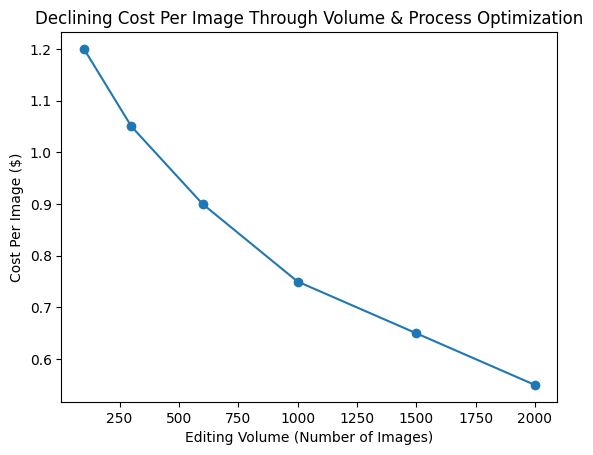
Figure: Declining cost per image through volume & process optimization
The graph shows a steady decline in cost per image as editing volume increases and processes become more optimized. At lower volumes, costs remain higher due to setup time, revisions, and inefficiencies.
As volume scales and workflows stabilize, the cost per image drops consistently, illustrating how batching, standardization, and long-term planning directly improve cost efficiency over time.
Frequently Asked Questions
1. What is the most effective first step to reduce bulk photo editing costs?
Standardizing editing requirements before scaling is the fastest way to cut unnecessary revisions and improve turnaround efficiency.
2. Is cheaper photo editing always better for large image volumes?
No. Extremely low pricing often leads to quality issues, delays, and rework, which ultimately increases total cost per image.
3. How does volume-based pricing help control budgets?
Volume-based pricing reflects real production efficiencies, making costs predictable and reducing per-image rates as order sizes grow.
4. Can trial batches really prevent large-scale cost overruns?
Yes. Trial batches expose misalignment early, allowing adjustments before full-scale production begins.
5. What metric should businesses track to monitor editing efficiency?
Cost per image is the most reliable metric, as it reveals inefficiencies that total invoices often hide.
Wrapping Up
Implementing these 10 best ways to save money on bulk product photo editing helps businesses manage high-volume image workflows. By focusing on standardization, smart batching, and platform-aligned edits, companies can reduce hidden costs.
Long-term planning and consistent vendor relationships further stabilize budgets. It prevents surprise expenses from revisions, onboarding, or fluctuating volumes.
Metrics like cost per image and trial batches ensure that efficiency gains are measurable and sustainable over time. Ultimately, controlling bulk photo editing costs is less about cutting corners and more about strategic, repeatable processes.
Adopting these methods allows brands to scale confidently, optimize resources, and keep their e-commerce visuals both compelling and cost-effective.